On the App Store August 18.On the App Store August 18. From the developer of DETENT, the cockpit-instruments app for flight simmers.
Say it out loud.
Hear real ATC, answer out loud, and get graded word by word, on device, in under a second.
Free to start, $29.99 one-time
$29.99 once · No subscription · Free to try
Which did you say?
Your turn. Key the mic and read it back.
Get it on iPhoneFree to start. No account. No subscription. No cloud.
- Price: Free to start, $29.99 one-time
- Device: iPhone 11 or newer, iOS 26+
- Voice + speech: 100% on-device
- Live mode: MSFS 2024 via bridge
Catches the mistake that matters
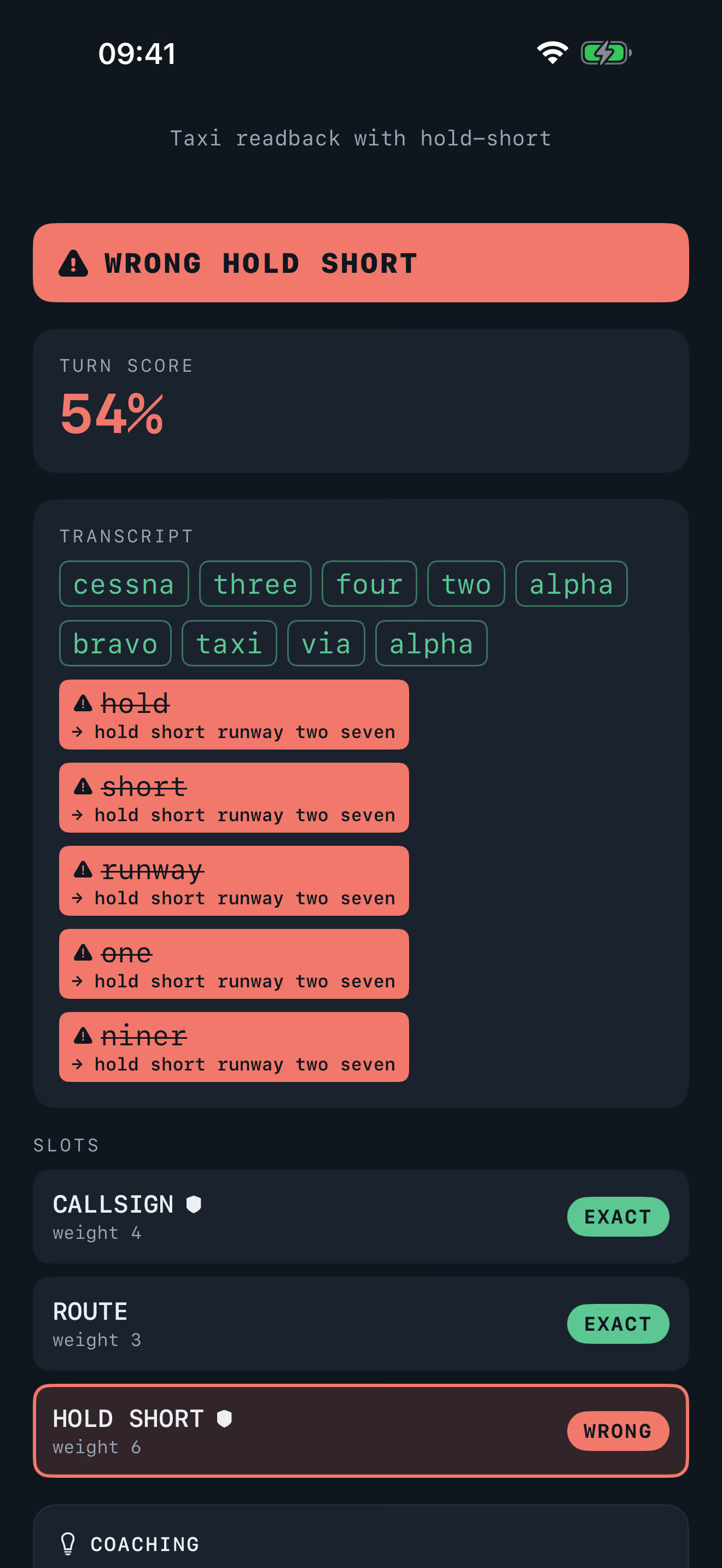
Wrong runway. Caught, not corrected.
Say the wrong runway or the wrong callsign and you will hear about it: flagged every time, never quietly smoothed over. Everywhere else SQUELCH listens the way a real controller would. Niner or nine, tree or three: real pilots do not all sound like the AIM, and neither should you.
We publish our speech-grading accuracy and how we measure it, including performance under cabin noise and how reliably a wrong runway or callsign is caught. See the full accuracy report.
- niner ↔ nine
- tree ↔ three
- fife ↔ five
- two seven ↔ twenty seven
- with information delta ↔ with delta
Youcleared touch and go runway two four cessna one two three alpha bravo
Runway two four is not runway two six. Wrong slots are flagged, never auto-corrected.
A wrong runway or a wrong callsign is always caught, never auto-corrected. Detecting the dangerous readback is the product.
See it grade
Hold. Speak. Release.
From mic fright to muscle memory, one call at a time.
- 01
Pick a scenario
Choose a lesson: pattern work at a towered field, non-towered calls, picking up ATIS (the airport's recorded weather and information broadcast), and more as the curriculum grows.
- 02
Hear the tower
The controller keys up first, in a voice generated on your phone. ATIS, a clearance, a traffic call: you hear the situation the way you will on the real frequency.
- 03
Hold to talk
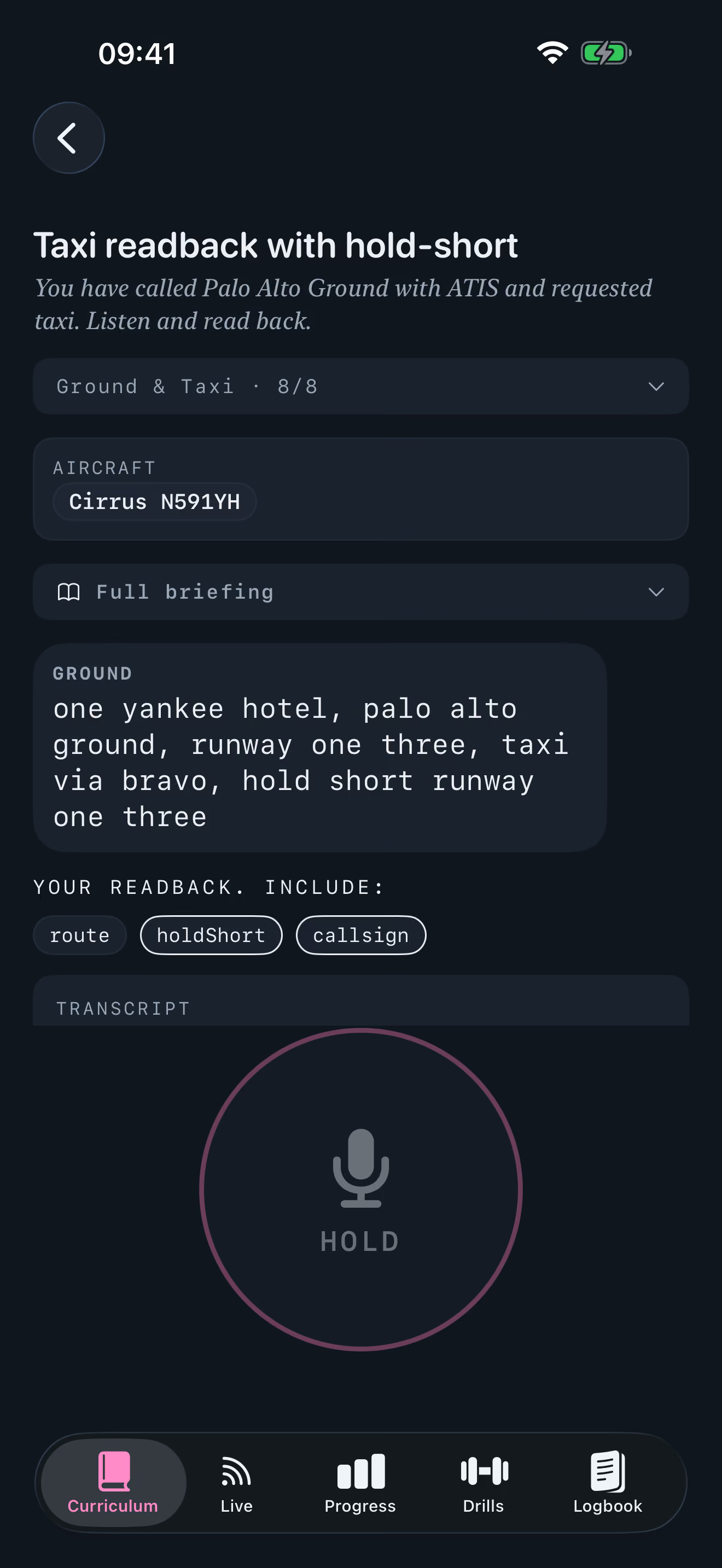
Press and hold the push-to-talk (PTT) bar like a real yoke switch. You will feel it click on key and unkey.
- 04
Make the call
Say the whole call out loud, at your own pace. A live transcript follows your voice as you speak.
- 05
Read your grade
Let go, and your call comes back graded word by word against FAA phraseology: variants accepted, errors flagged.
Workflow
How it works
From mic fright to muscle memory, one call at a time.
- 01
Pick a scenario
Choose a lesson: pattern work at a towered field, non-towered calls, picking up ATIS (the airport's recorded weather and information broadcast), and more as the curriculum grows.
- 02
Hear the tower
The controller keys up first, in a voice generated on your phone. ATIS, a clearance, a traffic call: you hear the situation the way you will on the real frequency.
- 03
Hold to talk
Press and hold the push-to-talk (PTT) bar like a real yoke switch. You will feel it click on key and unkey.
- 04
Make the call
Say the whole call out loud, at your own pace. A live transcript follows your voice as you speak.
- 05
Read your grade
Let go, and your call comes back graded word by word against FAA phraseology: variants accepted, errors flagged.
SQUELCH runs on iPhone with iOS 26 or later. Live mode is optional: pair the DETENT bridge on your PC to fly Microsoft Flight Simulator 2024 while SQUELCH prompts and grades your calls.
Curriculum
A curriculum that plays like a game
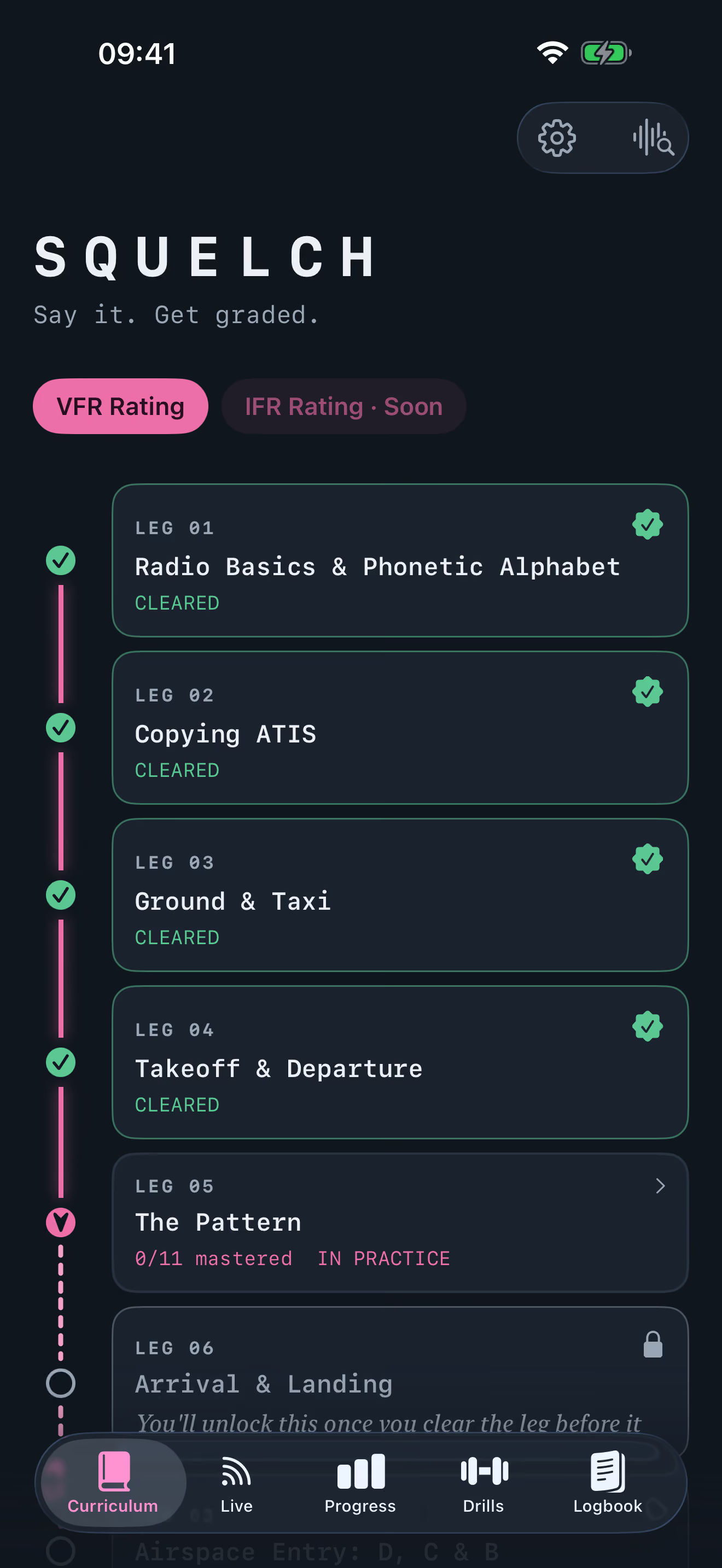
SQUELCH is built in tiers of lessons, each one generated fresh from a pool of real airports so you never drill the same call twice. The first six tiers are free, everything through arrival and landing. A one-time $29.99 purchase unlocks the rest: busy airspace, flight following, emergencies, and the capstone checkride.
Lessons
Short calls generated from real airports: pattern work, ATIS, ground and taxi, airspace entry, radar services, and more as you climb the tiers.
Stage checks
A tier will not open the next one until you pass its stage check, the mini-boss that proves the whole tier stuck, not just the easy calls.
The checkride
Clear every tier, and the capstone checkride puts it all together: the final exam for your radio work, start to finish.
Never the same call twice
Airports, runways, and traffic are drawn at random from an approved pool, so you learn the shape of a call, not one memorized field.
The controller
It talks back
SQUELCH keys up first, in a controller's voice generated right on your iPhone, then grades what you say back. It is a neural voice, not a robot readout, run through a radio chain so it sounds like a real frequency: EQ, compression, a noise bed, a squelch tail on the release.
- Generated on your phone
- The voice is synthesized on device, so it works in airplane mode. Nothing is streamed and nothing is fetched.
- Sounds like the radio
- Every call runs through the same radio chain as a real transmission, so you train against the noise and squelch you will key into for real.
- Controllers with a region
- US and UK controller voices, so the ATIS and the tower do not all sound like one person.
- A training voice, not a chatbot
- It flies the scenario and answers your calls with real phraseology. It is not a conversation with an AI, so what you hear is always a call you could hear on frequency.
From the developer
Mic fright is the last gate.
You know the moment: hand on the mic, the call rehearsed in your head, and the freeze anyway. Reading about radio calls will not fix that. Saying them out loud will. SQUELCH gives you a tower that never sighs, never rushes you, and grades every word you say so the real frequency stops being scary.
Dayel Ostraco, developer of DETENT, a GA pilot and simmer for over 20 years.
No strings
Pay once. Never again.
One payment unlocks the full VFR trainer, yours with free updates for life. The first six units are free, so you can hear the grading before you pay. Each new rating is its own one-time purchase, same deal. No account, and nothing ever leaves your iPhone.
$29.99, oncenot every year, like the others
- Start free, first six units
- $29.99, one time
- No account, ever
- On device, works offline
- Free updates, for life
Advantages
Why SQUELCH
Why SQUELCH, in full
Built by the developer of DETENT, the cockpit-instruments app for flight simmers, on the same principles: instrument-grade feel, total privacy, no strings attached. Buy it once and it is yours.
100% on-device speech
Your words are transcribed and graded entirely on your iPhone with Apple's on-device speech engine. Airplane mode is a supported configuration, not an afterthought.
Graded word by word
Every call you make comes back marked: green for exact, an underlined VAR tag for an accepted variant, red for wrong or missing. You see exactly which word needs work.
Errors get caught
A wrong runway or callsign is never smoothed over by fuzzy matching. Catching the mistake before it reaches a real frequency is the whole point.
Tolerant of real phraseology
Niner and nine, tree and three, twenty seven and two seven all count. You are graded on the call you actually made, not on sounding like a robot.
Graded in under a second
Release the push to talk and your grade is on screen in under a second. Drill a call twenty times without waiting on anything.
Progress
Know when a call is solid
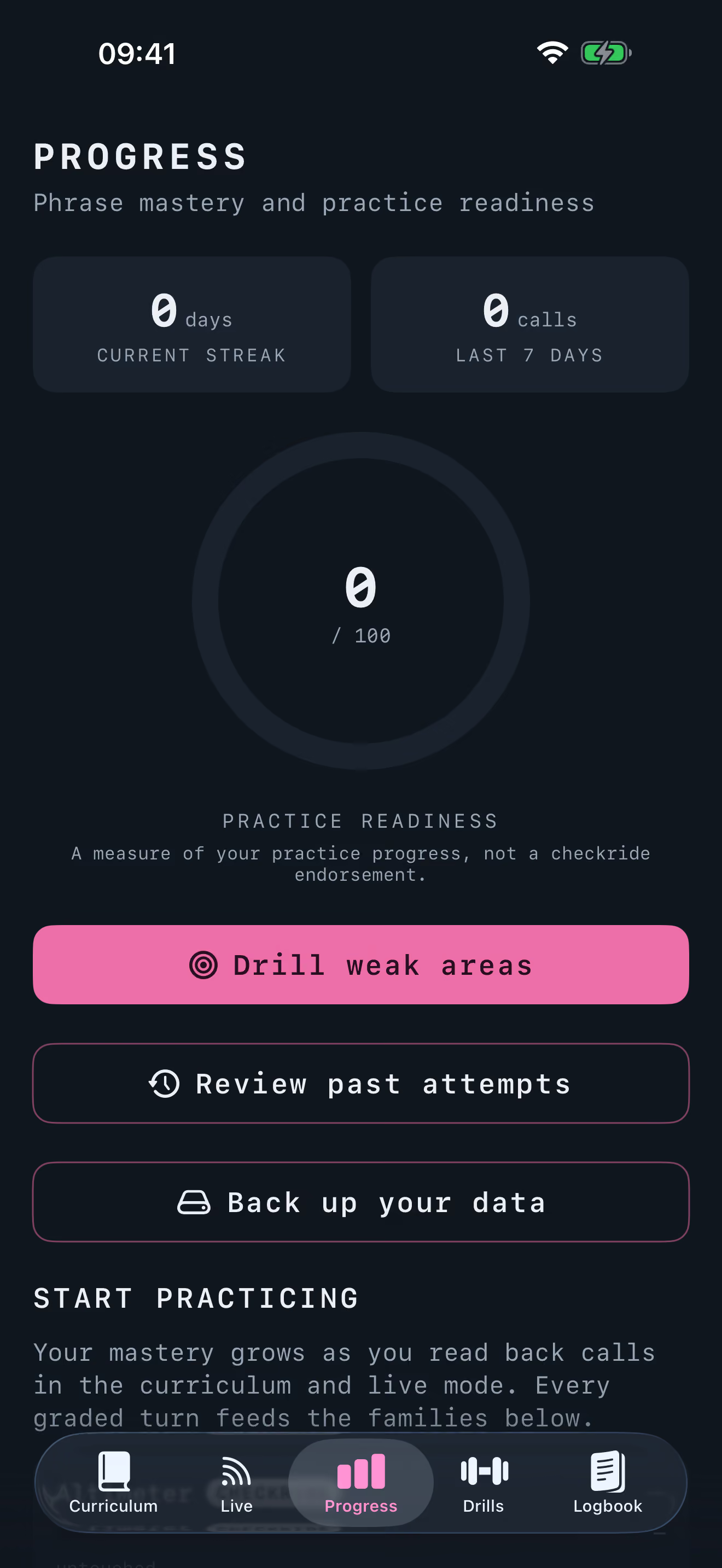
Every graded turn feeds a practice-readiness score and per-phrase mastery, so you can see which calls you have down and which still need reps. It measures your practice, not your certification.
Practice-readiness dial
One number for how ready your radio work is to practice, built from every call you have graded.
Mastery by phrase family
Altitudes, emergency declarations, frequencies: each tracked on its own so progress is specific, not a single grade.
Drill your weak areas
The calls you miss most become a targeted practice set, so reps go where they count.
Live mode
BetaLive mode: fly it for real in MSFS
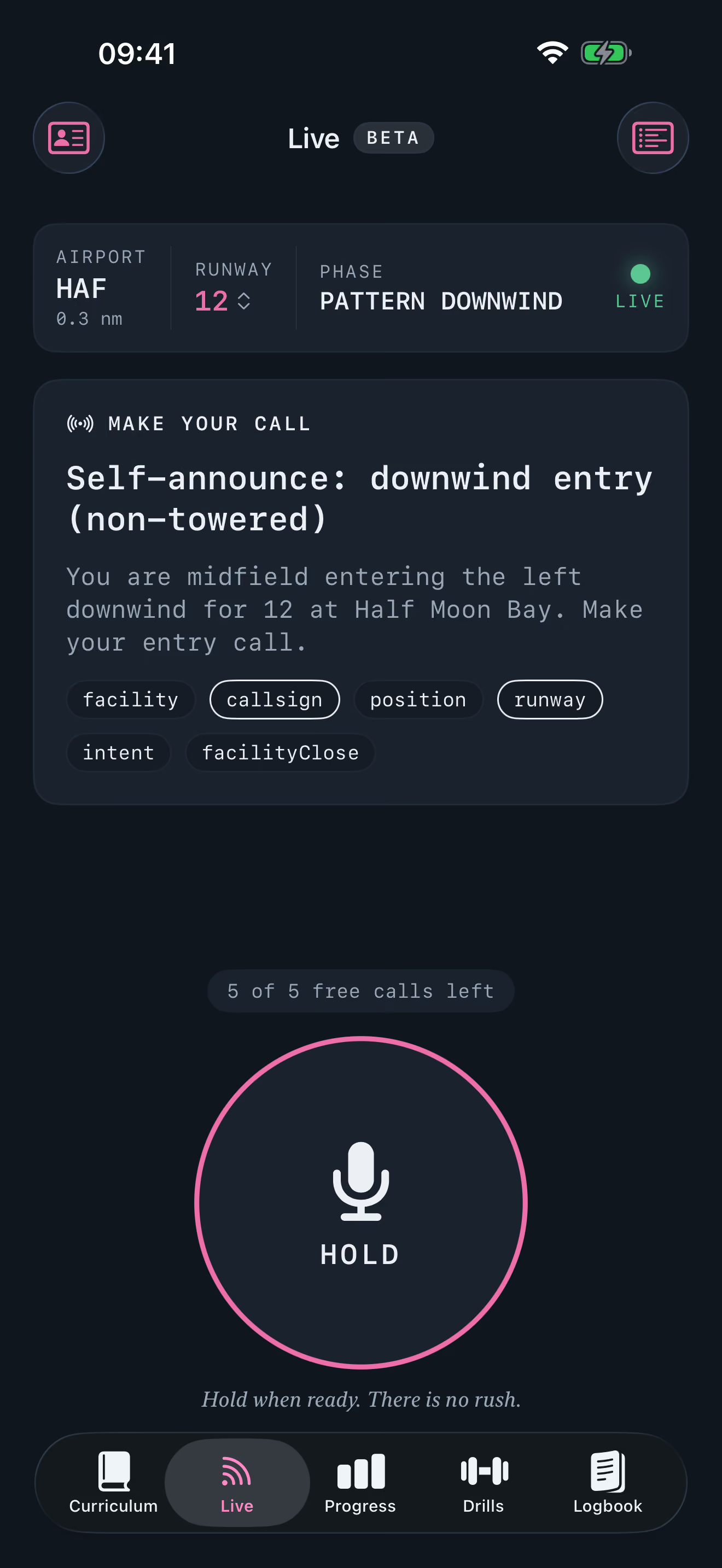
Pair SQUELCH with the DETENT bridge on your PC and your simulator becomes the scenario. Fly Microsoft Flight Simulator 2024 and SQUELCH reads your live situation over your own Wi-Fi, then prompts the right call at the right moment.
Live mode ships in beta: today it prompts the non-towered pattern calls, the downwind announcement and the go-around, and it expands with every release.
- 01
Fly
Any flight in MSFS 2024, from pattern laps to a cross country.
- 02
Bridge
The same lightweight bridge DETENT uses, over your own network. Nothing leaves your LAN.
- 03
Prompted
SQUELCH derives your situation and prompts the right call at the right moment.
- 04
Graded
Speak it out loud on your iPhone and get the word-by-word grade instantly.
Roadmap
What's next
You do not need every feature on day one. SQUELCH ships focused and grows deliberately: here is where it is headed next.
Towered and non-towered pattern curriculum
LaunchThe core loop: hear the tower, key up, get graded, every pattern call your home field can throw at you.
Live mode with the MSFS 2024 bridge
Launch windowPair with the bridge on your PC and SQUELCH prompts the calls that match your actual flight.
Expanded Live mode coverage
NextMore calls, more phases of flight, as the bridge widens what it can prompt.
Flight following and Class C/B transitions
LaunchThe busier-airspace calls that come after the pattern is second nature.
IFR clearances and copy-readback drills
NextClearance copy and readback drills for the instrument side of the radio.
From the flight line
What pilots are saying
Reviews from students and CFIs will land here as pilots get their hands on SQUELCH at launch.
SQUELCH is made by Dayel Ostraco.
Support
FAQ
- Do I need an internet connection?
- No. Speech recognition and grading run right there on your phone. There is no account, no cloud, and airplane mode works fine.
- Is my voice recorded or uploaded?
- Your audio is processed on device by Apple's speech engine and never leaves your phone. There is simply nothing to upload it to.
- Does the AI voice need a connection?
- No. The controller you hear is generated on your iPhone, not streamed from a server. Voice, transcription, and grading all run on device, so the whole app works in airplane mode.
- Will it accept how pilots actually talk?
- Yes. Say niner or nine, tree or three, twenty seven or two seven: SQUELCH accepts documented real-world variants. You should not have to sound like a textbook to get credit for a good call.
- What happens if I read back the wrong runway?
- It gets flagged, every time. Tolerance covers how you pronounce a call, never what you actually said: swap the runway or the callsign and SQUELCH will not let it slide. A trainer that quietly corrects your mistake is teaching you the wrong habit.
- Which devices does it run on?
- iPhone running iOS 26 or later, which means iPhone 11 and newer, including the iPhone SE 2nd generation.
- Does it work with Microsoft Flight Simulator?
- Yes. Pair Live mode with the DETENT bridge on your PC and it prompts the calls that match your actual flight in MSFS 2024. Live mode is in beta: today it prompts non-towered pattern calls, the downwind announcement and the go-around, with more on the way.
- Is any of it free?
- Yes. The first six tiers are free: everything through arrival and landing, so you can learn to talk at your home towered field start to finish before you spend a cent. A one-time purchase unlocks the rest: busy airspace, flight following, emergencies, and the capstone checkride.
- How much will it cost?
- $29.99, one time, for everything past the free first six tiers. No subscription, ever.
- Do I need a CFI or a medical to use it?
- No. SQUELCH is a practice tool for anyone who wants to feel comfortable on the radio, from pre-solo students to rusty pilots dusting off their currency.